Keep this screen awake until the bar hits 100% so your device doesn't pause the upload.
Your sheet music, alive.
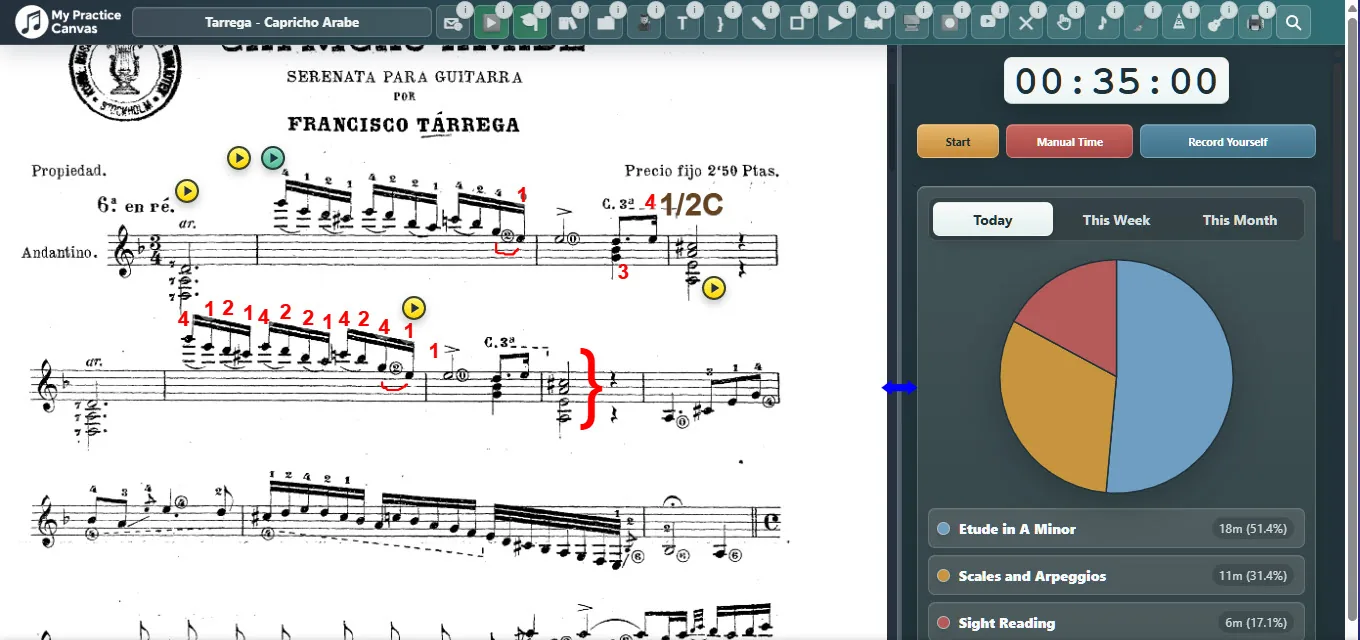
Practice from the score: mark fingerings, loop hard passages, and track progress. Teachers can send score-based video feedback and assignments without juggling PDFs, emails, and video links. Free to start. No app to install.
Already have an account or were invited by a teacher?
Choose the path that fits you
Practice Canvas serves two clear jobs: focused self-practice for musicians, and organized lesson delivery for teachers.
For musicians
Keep practice centered on the music.
Upload scores, add clean markings, loop difficult passages, and track the work you actually do.
A built-in Practice Coach plans each day from your pieces and keeps the clock while you play.
Loops and slow practice help difficult measures become manageable.
Start free, then upgrade when you want a full personal library.
For teachers
Send clearer lessons without rebuilding everything each week.
Leave video feedback on the score, assign the full lesson in one place, and see what students practiced or submitted.
Use it for asynchronous feedback, live lessons, or both.
Students access assigned lessons at no extra cost.
Reuse your best explanations, loops, and marked scores.
Choose the Teaching Format
Teachers can choose the right setup per student: asynchronous feedback, live lessons, or a hybrid of both.
Async
Asynchronous Video Feedback
Students submit practice videos and receive feedback directly on the score.
Students submit practice videos on assigned days.
You respond with video feedback placed on the exact measure.
Reminders and submission tracking keep the routine clear.
Best for accountability between lessons or fully asynchronous studios.
Live
Live Teaching Room
Use your regular Zoom or Google Meet link while Practice Canvas holds the score and lesson materials.
Create a reusable live-room link for each student.
Keep notes, dots, loops, and the Practice Coach beside the lesson.
Open assigned PDFs directly in the room when needed.
Best for teachers who already teach live and want a cleaner workspace.
Hybrid
Hybrid Teaching
Combine live lessons with score-based submissions between sessions.
Run live lessons with your preferred meeting tool.
Keep asynchronous submissions on for check-ins.
Use the same PDFs, dots, loops, and logs in both workflows.
Best for studios that want live connection plus between-lesson accountability.
Why Practice Canvas Works
Practice with better focusKeep the score, the reference, and your instructions in one place instead of splitting attention across tabs and apps.
Hear the details more clearlyLoop and slow down the exact passage you are learning so rhythm, timing, and phrasing become easier to catch.
Remember what to work onAnnotations on the page make each practice session more intentional and less guesswork-driven.
See progress over timeTracking sessions and streaks gives practice visible momentum, not just vague effort.
Give students clearer feedbackTeachers can point to the exact measure, leave a video there, and remove ambiguity from the lesson.
Teach more efficientlyReuse great explanations, assign lessons faster, and spend less time repeating the same setup week after week.
Choose Your Plan
Start free if you are practicing on your own. Upgrade when you want a full personal library or teacher tools. Every teacher plan includes student access for assigned lessons at no extra cost.
Pricing preview: Paid plans below are shown as monthly prices, and every Paid plan starts with a FREE 14-day trial. Free Practice stays free with no credit card required.
MonthlyAnnual (Save ~17%!)
Free Practice: No Credit Card
All Paid Plans: FREE 14-Day Trial
Teacher Plans: Students Access Lessons Free
Starter
Free Practice
$0
Free forever
No credit card required.
Best for trying the platform and practicing with a small starter setup.
1 PDF up to 10 pages
YouTube loops and annotations
Practice Coach included
For Musicians
Practice Studio
$5.99/mo
Monthly plan
Start with a FREE 14-day trial.
Best for individual musicians who want a full personal practice system.
Full personal PDF library
All core practice tools
Cloud sync and print
For Teachers
Teacher Studio
$19.99/mo
Monthly plan
Start with a FREE 14-day trial.
Best for solo teachers with a smaller active roster.
Up to 15 students
Video feedback and assignment tools
Student submissions and progress tracking
Most Popular
Teacher Plus
$39.99/mo
Monthly plan
Start with a FREE 14-day trial.
Best for growing studios that need more student capacity and room to scale.
Up to 40 students
All teacher workflow tools
Stronger room for studio growth
Large Studios
Teacher Pro
$69.99/mo
Monthly plan
Start with a FREE 14-day trial.
Best for larger studios that want maximum capacity and flexibility.
Unlimited students
Full teacher platform access
Built for larger active studios
Compare all features side by side▾
Feature
Free Practice
Practice Studio$5.99/mo
Teacher Studio$19.99/mo
Teacher Plus$39.99/mo
Teacher Pro$69.99/mo
Trial
No card needed
FREE 14-day trial
FREE 14-day trial
FREE 14-day trial
FREE 14-day trial
Capacity
PDF library
1 PDF / 10 pages
Full personal library
Teacher library + studio materials
Expanded studio library
Largest studio capacity
Students
-
-
Up to 15
Up to 40
Unlimited
Core Tools
Annotations
✓
✓
✓
✓
✓
YouTube loops
✓
✓
✓
✓
✓
Practice Coach
✓
✓
✓
✓
✓
Cloud sync
✓
✓
✓
✓
✓
Teacher Tools
Video feedback
-
-
✓
✓
✓
Lesson assignment
-
-
✓
✓
✓
Student submissions
-
-
✓
✓
✓
Progress tracking
-
-
✓
✓
✓
Frequently Asked Questions
What is Practice Canvas really meant to be for a musician?
It is meant to be your all-in-one practice space. Your sheet music, fingerings, annotations, looped videos, and lesson guidance all stay in one place instead of being scattered across books, loose pages, and separate apps. That makes practice more efficient and far less messy: you can move from one piece to another quickly, reopen a piece right where you left off, and keep your practice flow intact. It can be especially useful if you connect your computer to a TV so everything appears large and easy to see. A screen around 30 inches works especially well, but it is not required. It also works well on a regular laptop screen. On top of that, the built-in practice tracking helps you measure your work and stay motivated over time.
Do students need to pay?
No. In teacher plans, students can access assigned lessons, feedback videos, and practice materials at no extra cost. The teacher pays for the studio tools.
Is this meant to replace live lessons?
It can, but it does not have to. Teachers can choose Asynchronous video feedback, a Live Teaching Room that works with regular Zoom or Google Meet links, or Hybrid mode for both live lessons and between-session submissions.
How is this different from sending PDFs, notes, and videos separately?
Everything stays attached to the score. Instead of scattering lesson material across text messages, email, and separate video apps, the student opens one lesson and sees the annotations, loops, videos, and instructions in context.
Does this create extra work for teachers?
It is designed to reduce repeated work, not add to it. Teachers can annotate during the lesson, record short score-based reminders in context, reuse strong materials, and send everything together instead of rebuilding the same instructions every week.
How fast is it to prepare lessons and add fingerings?
Very fast. You can add annotations directly where they belong, and fingerings are especially quick: click and hold on the score, drag to a printed finger number already on the page, release to place it, and resize it with the mouse wheel. No typing and no slow menu workflow. Video feedback is also extremely fast: click a specific measure, the camera starts recording immediately, then click again to upload. In practice, that means a teacher can leave a useful video right on the score in just two clicks.
Is there a free way to try it?
Yes. Free Practice gives you a no-credit-card entry point, and every paid plan starts with a free 14-day trial so you can test the workflow before committing.
Can I change or cancel my plan later?
Yes. Click the profile icon, open Manage Membership, and from there you can upgrade, downgrade, switch between monthly and annual billing, or choose Cancel Membership. If you cancel, the cancellation takes effect immediately. That gives you room to start small, test the workflow, and move to the plan that fits your practice or studio as it grows.
Enter text to include in the footer of lesson notification emails (optional):
REC
📹 Recording Complete!
Watch your video below, then click the yellow button to send it.
Preparing for upload...
⚠️ Warning: Uploading will replace any previous video you sent for this lesson!
67%
✨ Auto-gain active (preserves dynamics)
✨ Auto-gain active (preserves dynamics)
Level:
Low
High
CLIP!
×
Manage Students
Loading students...
Name
Email
Submission Day
Actions
Add Student
×
Independent & Teacher Usage
Account
Email
Subscription
Storage Used
Monthly Egress
Students
Click “Independent & Teacher Usage” to load account statistics.
📝 Previewing your draft — students still see the published version.
🤖 AI Book Companion
👋 I'm an AI assistant — not Eduardo himself. Ask me anything about playing, and I'll answer using only what Dr. Eduardo Minozzi Costa wrote in this book.
🤖 This is an AI assistant — not Eduardo. Every answer comes only from Dr. Costa's book.
Message All Students
×
×
Assign PDF
Select a student to assign this PDF to:
Loading students...
×
Student Work
Select a PDF to view this student's annotations:
Loading assigned PDFs...
Assign PDF:
To:
Question
Select Video Range
Use the player to choose the exact section you want linked to this dot. Set the start and end markers, preview the loop, then save.
Loading video…
Format supports mm:ss or hh:mm:ss (e.g., 1:32 or 0:45). End time must be after start time.
📋 Daily Lesson Log
Loading...
📋
Loading lesson log...
×
Membership Updated!
Your membership details have been processed.
×
Important: Managing Your Subscription
If you choose to cancel your membership from the Stripe portal, please be aware that all your associated files (PDFs, annotations, and videos) will be permanently deleted from MyPracticeCanvas.
If you are upgrading, downgrading, or making other changes that keep your membership active, your files will not be deleted.